StorNext

Proven in some of the world’s most data intensive industries such as media and entertainment, oil and gas, satellite imaging, and genome research, Quantum StorNext offers you high-performance file sharing as well as enterprise data management and protection. The release of StorNext 4.0 builds on this established technology with features such as Replication, Nearline Deduplication, Distributed Data Movers, Partial File Retrieval, and a streamlined Management Console. Comprised of two core components, a shared SAN file system and Storage Manager, StorNext enables you to share, manage, and preserve your business critical information like never before.

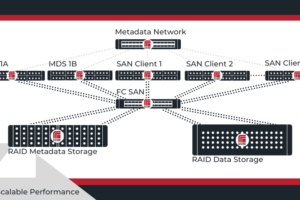
The StorNext shared SAN file system accelerates business operations by storing information rapidly, then sharing it simultaneously across heterogeneous platforms, rich media applications, and most disk and tape systems. Enabling customers to consolidate shared storage pools of images, media content, analytical data, and other key digital assets, StorNext makes it possible to process and distribute content more quickly. Even in heterogeneous environments across Linux, Mac, Unix, and Windows operating systems, all files are easily accessible to all hosts whether on the SAN or LAN.

Supported Platforms

    • Sun Solaris
    • HP-UX
    • IBM AIX
    • Redhat EL
    • SuSE ES
    • Microsoft Windows

Ideal Uses

  • The Quantum is ideal for:

    • Media and Entertainment
    • Oil and Gas
    • Satellite Imaging
    • Genome Research

Highlights, Key Features & Benefits

    • Deduplication
      StorNext deduplication reduces the amount of capacity consumed by data on disk. Unlike compression technologies that use static “pattern table” methodologies based on an individual file being compressed, StorNext Deduplication (SNDD) builds its redundancy index based on all the data being deduplicated, not just the file being processed at that moment. SNDD will find redundancies within a file making it extremely efficient at saving storage space (up to 93% in some documented use cases).
    • Replication
      StorNext Replication is an asynchronous, host based replication feature that is highly flexible and configurable. Replication is implemented at the directory level and is policy driven to initiate timed or user initiated copies of data. The policy engine within StorNext also includes the capability to specify how copies are maintained and managed on both the source and target locations. Flexible replication options include n-to1, 1-to-n, and cascading. Intelligent replication can also be configured, deduplicating data prior to replication to reduce bandwidth overhead and storage requirements at the remote location.
    • Distributed LAN Clients (DLC)
      DLC allows servers on an IP network to connect to StorNext volumes through SAN clients designated as clustered gateway servers. These gateways are SAN clients that connect directly to the shared storage pool over FC and/or iSCSI, but primarily service DLC I/O. DLC’s IP protocol is designed for higher per-stream performance and resilient communication. This specialized protocol is optimized for StorNext and can achieve near line-rate throughputs over standard IP network connections. The protocol also provides resiliency by having each DLC automatically attach to multiple clustered gateways.
    • Storage Manager
      StorNext Storage Manager is an optional software component of StorNext that provides advanced data preservation services. Storage Manager is responsible for automated policy-based transparent data movement as well as capacity management of storage devices. Storage Manager accomplishes this through an integrated policy engine which administrators can easily customize based on specific needs.
    • Distributed Data Mover (DDM)
      Distributed Data Mover acts as the conduit for passing data to and from the storage tiers. As the archive becomes more active, you can simply add more DDMs to scale the system performance. These movers enable reads and writes of file copies for data preservation and retrieval while still providing fast access to data via the copy on primary disk.
    • Affinities
      Affinities are used to ‘steer’ data within the file system to a specific "stripe group" which is made of one or multiple LUNs. Assigned at a directory level, Affinities can be used to steer data to the most appropriate device.